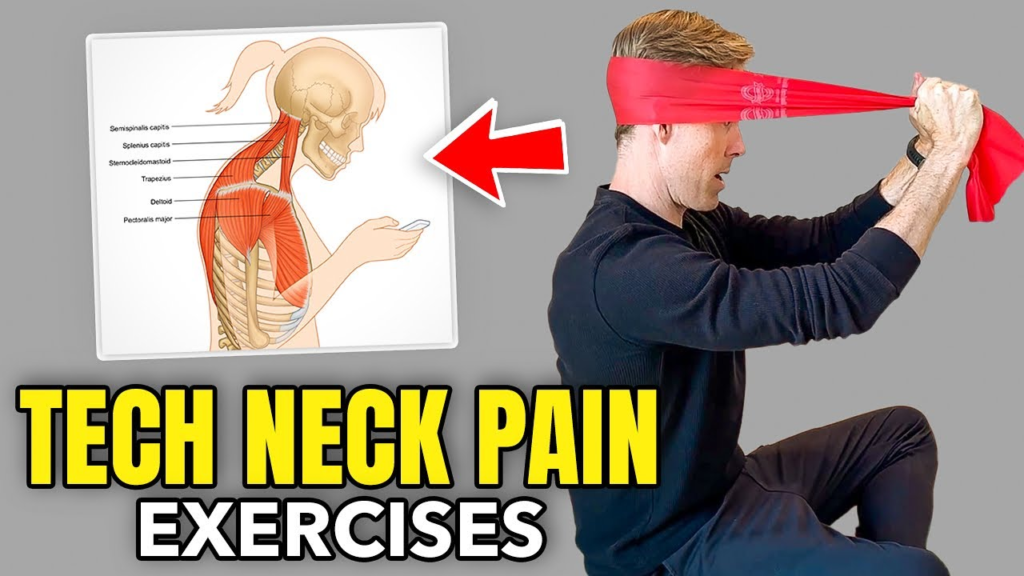
What Are Tech Neck Exercises?
Tech neck exercises are simple stretches and strengthening movements designed to relieve neck pain, reduce muscle stiffness, and improve posture caused by prolonged use of smartphones, computers, tablets, and other digital devices. If you spend hours looking down at screens, these exercises can help reduce discomfort, improve flexibility, and strengthen the muscles that support your neck and upper back.
Modern lifestyles often require long hours in front of digital screens. Over time, this habit can lead to poor posture, commonly known as tech neck. Performing the right exercises regularly, combined with proper ergonomics, can help reduce symptoms and lower the risk of long-term neck problems.
What Is Tech Neck?
Tech neck refers to neck and upper back discomfort caused by repeatedly tilting the head forward while using electronic devices.
The human head weighs approximately 10–12 pounds in a neutral position. As the head tilts forward, the load on the neck muscles increases significantly, causing strain over time.
Common causes include:
- Using smartphones for long periods
- Working on laptops without proper posture
- Poor workstation setup
- Lack of movement during the day
- Extended gaming sessions
Common Symptoms of Tech Neck
Recognizing the symptoms early allows you to take corrective action.
Typical signs include:
- Neck stiffness
- Shoulder pain
- Upper back discomfort
- Headaches
- Muscle tightness
- Reduced neck mobility
- Poor posture
- Fatigue after screen use
If symptoms are severe, persistent, or accompanied by numbness, weakness, or radiating pain, consult a healthcare professional.
Why Tech Neck Exercises Are Important
Regular exercises help restore muscle balance and improve flexibility.
Benefits include:
- Reduced neck pain
- Improved posture
- Better flexibility
- Stronger neck muscles
- Less shoulder tension
- Improved blood circulation
- Lower risk of chronic discomfort
When combined with healthy posture habits, these exercises can make everyday screen use more comfortable.
Best Tech Neck Exercises
The following exercises are commonly recommended to improve mobility and reduce muscle tightness. Move gently and stop if you experience sharp pain.
Chin Tucks
Chin tucks help strengthen the deep neck muscles and encourage proper head alignment.
How to perform:
- Sit or stand with your back straight.
- Keep your eyes looking forward.
- Gently pull your chin straight back, creating a “double chin.”
- Hold for 5–10 seconds.
- Repeat 10 times.
Neck Side Stretch
This stretch helps loosen tight muscles along the sides of the neck.
Steps:
- Sit upright.
- Tilt your head toward one shoulder.
- Hold for 20–30 seconds.
- Repeat on the opposite side.
Avoid pulling forcefully on your head.
Upper Trapezius Stretch
This exercise targets the muscles that often become tight from prolonged computer work.
Instructions:
- Sit comfortably.
- Relax your shoulders.
- Gently tilt your head sideways.
- Hold for 20–30 seconds.
- Repeat several times.
Levator Scapulae Stretch
This stretch focuses on a muscle connecting the neck and shoulder blade.
To perform:
- Turn your head about 45 degrees.
- Look downward toward your armpit.
- Hold the stretch for 20–30 seconds.
- Repeat on both sides.
Shoulder Blade Squeezes
Strong upper back muscles support better posture.
Steps:
- Sit upright.
- Pull your shoulder blades together.
- Hold for 5 seconds.
- Relax slowly.
- Repeat 10–15 times.
Chest Stretch
Tight chest muscles often contribute to rounded shoulders.
Stand in a doorway, place your forearms on the frame, and gently lean forward until you feel a comfortable stretch across your chest.
Hold for 20–30 seconds.
Strengthening Exercises for Better Posture
Stretching alone is not enough.
Strengthening exercises help maintain long-term improvements.
Wall Angels
Stand with your back against a wall.
Move your arms slowly upward and downward while maintaining contact with the wall.
This exercise promotes shoulder mobility and posture awareness.
Resistance Band Rows
Using a resistance band helps strengthen the upper back.
Benefits include:
- Better posture
- Stronger shoulders
- Improved spinal support
Thoracic Extension
Place a foam roller under your upper back and gently extend over it.
This movement helps improve upper spine mobility.
Personal Experience
We have seen many office workers complain of neck stiffness after spending long hours in front of computers. One simple change that consistently made a difference was combining short movement breaks with a daily routine of chin tucks, shoulder blade squeezes, and gentle stretches.
Within a few weeks, many reported feeling less tension at the end of the workday and found it easier to maintain an upright posture. While experiences vary, building these habits into the daily routine often proved more effective than relying on occasional stretching alone.
Case Study: Office Worker with Tech Neck Symptoms
An employee working remotely spent nearly eight hours each day on a laptop.
Common complaints included:
- Neck pain
- Tight shoulders
- Frequent headaches
- Poor posture
A physical therapist recommended:
- Daily posture exercises
- Hourly movement breaks
- Ergonomic desk adjustments
- Chin tuck exercises
- Upper back strengthening
After several weeks of consistent practice, the employee reported reduced discomfort, better posture awareness, and fewer tension headaches. This example highlights how exercise combined with ergonomic improvements can support recovery.
Tech Neck Exercises vs Passive Rest
| Feature | Tech Neck Exercises | Passive Rest |
|---|---|---|
| Improves Flexibility | Yes | Limited |
| Strengthens Muscles | Yes | No |
| Improves Posture | Yes | Minimal |
| Reduces Stiffness | Yes | Temporary |
| Prevents Future Problems | Yes | Limited |
| Encourages Mobility | Yes | No |
Gentle movement is often more effective than simply resting for mild posture-related stiffness.
Additional Tips to Prevent Tech Neck
Daily habits play a major role in preventing recurrence.
Helpful practices include:
- Keep screens at eye level.
- Use an ergonomic chair.
- Take movement breaks every 30–60 minutes.
- Avoid looking down at your phone for extended periods.
- Maintain a neutral sitting posture.
- Use a supportive pillow when sleeping.
- Stay physically active throughout the day.
Ergonomic Workspace Setup
A well-designed workstation reduces unnecessary strain.
Monitor Height
Position the top of the screen at or slightly below eye level.
Chair Support
Choose a chair that supports the lower back and encourages upright posture.
Keyboard Placement
Keep elbows close to your body with wrists in a neutral position.
Foot Position
Keep both feet flat on the floor or on a footrest.
Common Mistakes to Avoid
Many people unknowingly worsen their symptoms.
Avoid these habits:
- Looking down at your phone for hours.
- Holding stretches too aggressively.
- Skipping strengthening exercises.
- Sitting for long periods without breaks.
- Ignoring persistent pain.
- Using poor workstation ergonomics.
Correcting these habits is just as important as exercising.
Expert Opinion
Many physical therapists emphasize that the best approach to managing tech neck combines exercise, posture correction, ergonomic adjustments, and regular movement. No single exercise can eliminate discomfort if poor posture habits continue throughout the day.
Experts often recommend starting with gentle stretches and gradually adding strengthening exercises as comfort improves. Consistency is more important than intensity.
Who Can Benefit from Tech Neck Exercises?
These exercises may be helpful for:
- Office workers
- Students
- Gamers
- Remote employees
- Graphic designers
- Software developers
- Content creators
- Anyone who spends long hours using digital devices
They are suitable for most people when performed correctly and without causing pain.
Read More: tamildhooms
Pro Tip
Set a reminder to stand up and move every 30–60 minutes. Combine regular movement breaks with daily tech neck exercises and an ergonomic workspace. Small changes performed consistently are often more effective than occasional long stretching sessions.
Frequently Asked Questions
How often should I do tech neck exercises?
Many people benefit from performing gentle stretches and posture exercises once or twice daily. If discomfort persists, consult a healthcare professional for personalized guidance.
Can tech neck exercises completely cure neck pain?
They can help reduce posture-related discomfort, improve flexibility, and strengthen supporting muscles. However, neck pain caused by injuries or medical conditions may require professional evaluation and treatment.
How long does it take to see results?
Some individuals notice reduced stiffness within a few weeks of consistent exercise and improved posture habits, though results vary depending on the cause and severity of symptoms.
Are tech neck exercises safe?
When performed gently and with proper technique, these exercises are generally safe for most people. Stop if you experience sharp pain or worsening symptoms and seek medical advice if needed.
Can improving posture prevent tech neck?
Yes. Maintaining good posture, using ergonomic workstations, taking regular breaks, and performing strengthening exercises can reduce the likelihood of developing tech neck symptoms.
Final Thoughts
Tech neck exercises are a practical way to reduce neck stiffness, improve posture, and support overall spinal health for people who spend long hours using digital devices. While gentle stretches and strengthening exercises can be highly beneficial, lasting improvement usually comes from combining them with healthy workplace ergonomics, regular movement, and mindful posture throughout the day.
By making these habits part of your daily routine, you can help minimize discomfort, stay more comfortable during screen time, and support long-term neck and upper back health.