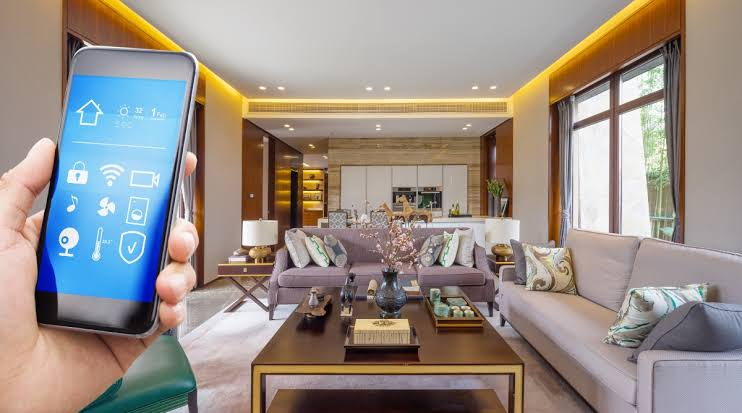
What Is a Smart Home?
A smart home is a house equipped with internet-connected devices that can be monitored, controlled, and automated remotely using a smartphone, tablet, or voice assistant. These devices communicate with one another to improve convenience, security, energy efficiency, and overall comfort.
From smart lights and security cameras to thermostats, door locks, and voice assistants, smart home technology simplifies everyday tasks while helping homeowners save time and reduce energy costs. Whether you’re building a new home or upgrading an existing one, a smart home can make daily living more efficient and secure.
How Does Smart Home Technology Work?
Smart home systems rely on three key components:
Internet Connection
Most smart devices connect through Wi-Fi, Zigbee, Z-Wave, Thread, or Bluetooth, allowing them to communicate with each other and cloud services.
Smart Hub or Voice Assistant
Many homes use a central controller such as:
- Amazon Alexa
- Google Assistant
- Apple HomeKit
These platforms let users manage multiple devices from a single app or with voice commands.
Automation
Automation allows devices to perform actions without manual input.
For example:
- Lights turn on automatically after sunset.
- Thermostats adjust room temperature based on occupancy.
- Security cameras begin recording when motion is detected.
Essential Smart Home Devices
Smart Lighting
Smart bulbs allow you to:
- Control lights remotely
- Adjust brightness
- Change colors
- Schedule automatic on/off times
They also consume less energy than traditional bulbs.
Smart Thermostats
Smart thermostats learn your daily routine and automatically optimize heating and cooling.
Benefits include:
- Lower electricity bills
- Improved comfort
- Remote temperature control
Smart Security Cameras
Modern security cameras provide:
- Live video streaming
- Motion detection alerts
- Cloud recording
- Night vision
They improve home security even when you’re away.
Smart Door Locks
These locks eliminate the need for physical keys.
Features include:
- Mobile unlocking
- Temporary guest access
- Auto-lock functionality
- Activity logs
Smart Speakers
Devices with built-in voice assistants can:
- Play music
- Control smart devices
- Set reminders
- Answer questions
- Manage daily routines
Comparison Table: Popular Smart Home Devices
| Device | Main Purpose | Benefits | Ideal For |
|---|---|---|---|
| Smart Lights | Lighting Automation | Energy savings, convenience | Every home |
| Smart Thermostat | Climate Control | Lower energy bills | Homeowners |
| Smart Door Lock | Security | Keyless access | Families |
| Smart Camera | Surveillance | Remote monitoring | Home security |
| Smart Speaker | Voice Control | Home automation | Smart ecosystems |
Benefits of a Smart Home
Smart home technology offers several advantages beyond convenience.
Better Security
Connected security systems provide instant notifications if unusual activity is detected.
Features include:
- Motion alerts
- Video monitoring
- Smart alarms
- Remote access
Energy Efficiency
Smart devices automatically reduce unnecessary electricity usage.
Examples include:
- Turning off unused lights
- Optimizing heating schedules
- Monitoring energy consumption
Greater Convenience
Many daily tasks become automated, including:
- Opening garage doors
- Adjusting lighting
- Playing music
- Locking doors
Increased Property Value
Homes equipped with smart technology often attract buyers looking for modern features and improved energy efficiency.
Popular Smart Home Automation Ideas
Automation makes a smart home truly intelligent.
Some practical ideas include:
- Morning routines that turn on lights and start the coffee maker.
- Night routines that lock doors and switch off appliances.
- Motion sensors that activate hallway lighting.
- Smart blinds that open automatically with sunrise.
- Voice commands to control entertainment systems.
Small automations can significantly improve everyday convenience.
Smart Home Ecosystems
Amazon Alexa
Alexa supports thousands of compatible devices and offers extensive voice-control capabilities.
Google Home
Google Home integrates seamlessly with Android devices and Google services.
Apple HomeKit
HomeKit focuses on privacy and secure communication between compatible smart devices.
Choosing one ecosystem helps simplify device management and automation.
Smart Home Security Best Practices
As more devices connect to the internet, protecting them becomes increasingly important.
Security recommendations include:
- Use strong passwords.
- Enable two-factor authentication.
- Update firmware regularly.
- Secure your Wi-Fi network.
- Buy devices from trusted brands.
Maintaining good cybersecurity practices helps protect your home network.
Personal Experience: Start Small Before Expanding
From practical experience, one of the most effective approaches is to begin with a few essential devices instead of automating everything at once. Many homeowners start with smart lighting and a smart speaker, then gradually add thermostats, cameras, and door locks as they become comfortable with the technology.
This approach keeps costs manageable and makes it easier to learn how different devices work together.
Case Study: Reducing Energy Costs with Smart Automation
A family installed smart lighting and a programmable thermostat in their home.
Within several months, they noticed:
- Lower monthly electricity usage
- Improved indoor comfort
- Fewer forgotten lights left on
- Better control while traveling
The biggest improvement came from automated schedules that adjusted lighting and temperature without manual intervention. This illustrates how smart home technology can provide long-term savings alongside greater convenience.
Challenges of Smart Homes
Despite their advantages, smart homes also present a few challenges.
Common issues include:
- Initial installation costs
- Internet dependency
- Device compatibility
- Learning curve for beginners
- Privacy concerns
Planning your smart home around a single ecosystem can reduce compatibility problems.
Future of Smart Homes
Smart home technology continues to evolve rapidly.
Future developments may include:
AI-Powered Automation
Artificial intelligence will better understand user habits and automate routines more accurately.
Matter Standard Adoption
Universal compatibility between devices from different manufacturers will improve setup and integration.
Advanced Energy Management
Homes will automatically optimize electricity usage based on energy prices and weather conditions.
Improved Health Monitoring
Smart homes may monitor indoor air quality, sleep patterns, and environmental conditions to promote healthier living.
Smarter Home Security
AI-powered cameras will become better at distinguishing between family members, visitors, pets, and potential threats.
Tips for Building Your First Smart Home
If you’re just starting, consider these recommendations:
- Choose one smart home ecosystem.
- Begin with lighting and smart speakers.
- Add security devices gradually.
- Use automation routines instead of manual controls.
- Secure your home network.
- Buy devices that support future standards like Matter.
- Keep all software updated.
A gradual approach makes the transition smoother and more cost-effective.
Read More: tamildhooms
Pro-Tip
Don’t focus on buying the most expensive smart devices. Instead, build a reliable ecosystem with compatible products that solve everyday problems. A well-planned smart home with a few high-quality devices often delivers a better experience than a collection of disconnected gadgets.
Frequently Asked Questions (FAQs)
What is a smart home?
A smart home is a residence equipped with internet-connected devices that can be controlled remotely or automated to improve convenience, security, and energy efficiency.
Do smart homes require Wi-Fi?
Most smart home devices use Wi-Fi or other wireless protocols like Zigbee, Z-Wave, or Thread. A stable internet connection provides the best experience for remote access and automation.
Are smart homes safe?
Yes, smart homes are generally safe when users secure their networks, use strong passwords, enable two-factor authentication, and keep device firmware updated.
Which smart home system is best?
The best system depends on your existing devices and preferences. Amazon Alexa, Google Home, and Apple HomeKit are among the most popular smart home ecosystems.
Is a smart home worth it?
For many homeowners, a smart home is worth the investment because it enhances convenience, improves security, reduces energy consumption, and can increase property value over time.